For the American farm
Every bill,
in the books.
Snap it in the cab or drop a file. FarmBooks reads every bill, sorts it into your categories, and hands you a clean spreadsheet. No data entry — ever.
Two minutes to set up. Then just send your bills.
The read
Watch it read a bill.
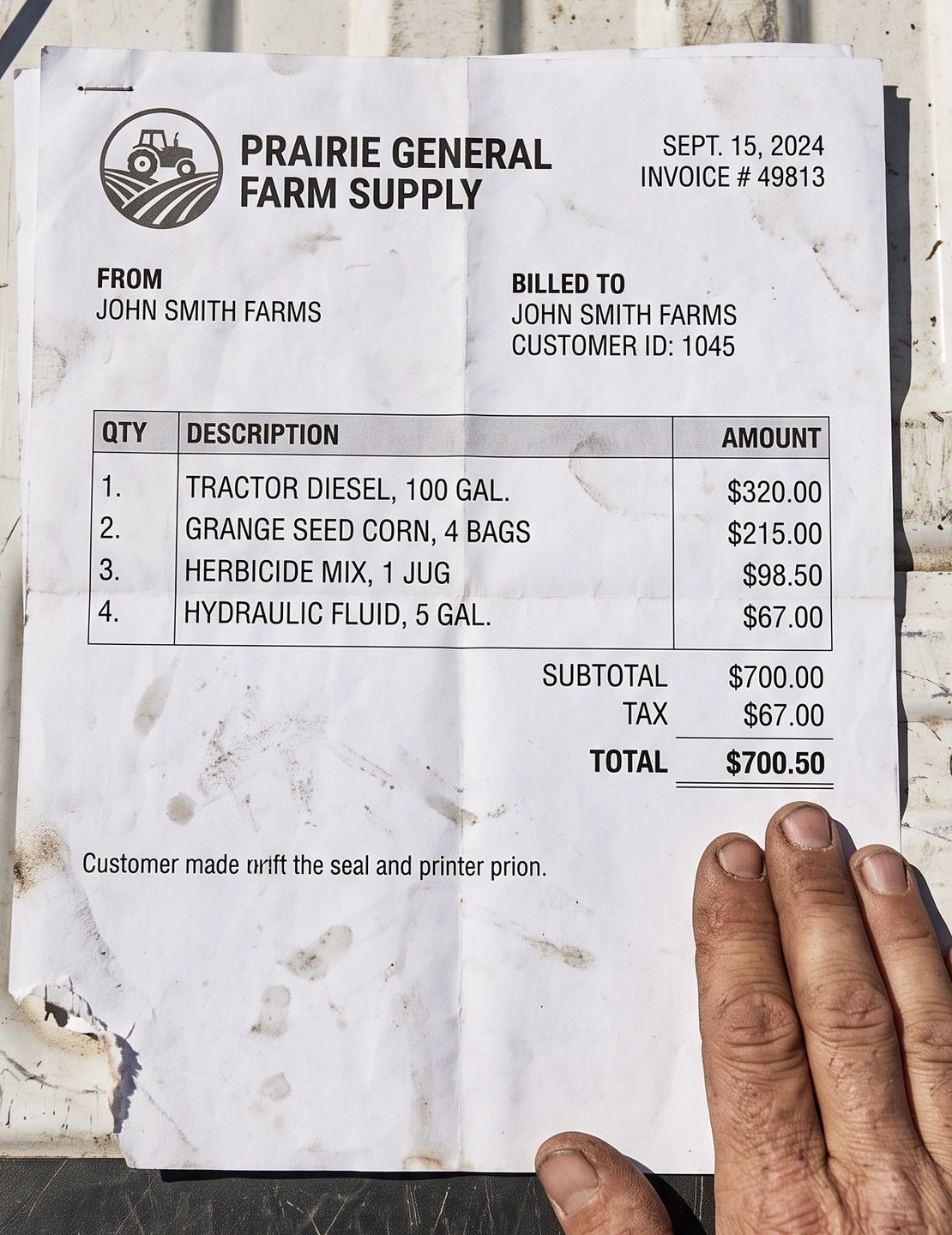
One bill off the tailgate, start to finish — scroll to follow it. — step by step. You photograph it once. Everything after that happens without you.
Before the shutter will fire
Light
Enough of it, and no glare across the paper.
Frame
All four corners of the bill inside the shot.
Focus
Sharp enough to read the smallest printed line.
Until all three pass, the button will not press. It would rather stop you in the field than hand you an unreadable bill a month later.
On the ticket
- Vendor
- Prairie General Farm Supply
- Date
- Sept 15, 2024
- Invoice no.
- 49813
- Tractor diesel
- $320.00
- Grange seed corn
- $215.00
- Herbicide mix
- $98.50
- Hydraulic fluid
- $67.00
- Printed total
- $700.50
Where each line went
TRACTOR DIESEL, 100 GAL.
Fuel & Oil
$320.00
Line 1GRANGE SEED CORN, 4 BAGS
Seed
$215.00
Line 2HERBICIDE MIX, 1 JUG
Chemicals
$98.50
Line 3HYDRAULIC FLUID, 5 GAL.
Repairs & Maintenance
$67.00
Line 4
Co-op shorthand gets translated. The words the vendor printed are kept beside the reading, and no translation can move a dollar figure.
The arithmetic
- Fuel & Oil
- $320.00
- Seed
- $215.00
- Chemicals
- $98.50
- Repairs & Maintenance
- $67.00
- Four lines, added up
- $0.00
- Total printed on the bill
- $700.50
Difference $0.00the bill adds up
If these two disagree by more than two cents, the bill stops and waits for you.
In the books
$700.50
filed under four categories, from one photograph
- Fuel & Oil$320.00
- Seed$215.00
- Chemicals$98.50
- Repairs & Maintenance$67.00
You typed none of it, and the bill it came from is one tap away for as long as you keep the farm.
01
You take one picture
On the tailgate, in the sun, with one bar of signal. The camera will not let you take a blurry one — it waits until the light, the framing and the focus are good, then the shutter arms.
02
It knows who the bill is from
Vendor, date, invoice number — read off the paper and kept exactly as they were printed. You do not type any of it.
03
Every line, and what you were charged for it
Diesel, seed corn, herbicide, hydraulic fluid. Four lines, four amounts, straight off a folded piece of paper that spent the morning in a truck.
04
It files them under your categories
Each line lands in the category it belongs to, and the words the vendor printed stay beside it. Co-op shorthand gets translated; the original never gets thrown away.
05
It checks the bill against itself
The four lines have to add up to the total printed at the bottom, within two cents, or the bill stops and waits for you. A spreadsheet cannot check its own arithmetic. This checks every bill, every time.
06
In the books
One photograph in, one bill filed, four categories updated. Nothing typed, nothing to remember at year end.
- 01. You take one picture. On the tailgate, in the sun, with one bar of signal. The camera will not let you take a blurry one — it waits until the light, the framing and the focus are good, then the shutter arms.
- 02. It knows who the bill is from. Vendor, date, invoice number — read off the paper and kept exactly as they were printed. You do not type any of it.
- 03. Every line, and what you were charged for it. Diesel, seed corn, herbicide, hydraulic fluid. Four lines, four amounts, straight off a folded piece of paper that spent the morning in a truck.
- 04. It files them under your categories. Each line lands in the category it belongs to, and the words the vendor printed stay beside it. Co-op shorthand gets translated; the original never gets thrown away.
- 05. It checks the bill against itself. The four lines have to add up to the total printed at the bottom, within two cents, or the bill stops and waits for you. A spreadsheet cannot check its own arithmetic. This checks every bill, every time.
- 06. In the books. One photograph in, one bill filed, four categories updated. Nothing typed, nothing to remember at year end.
One photograph, eight fields, four categories — and a total that agrees with the lines above it.
- 01
You take one picture
On the tailgate, in the sun, with one bar of signal. The camera will not let you take a blurry one — it waits until the light, the framing and the focus are good, then the shutter arms.
Before the shutter will fire
Light
Enough of it, and no glare across the paper.
Frame
All four corners of the bill inside the shot.
Focus
Sharp enough to read the smallest printed line.
Until all three pass, the button will not press. It would rather stop you in the field than hand you an unreadable bill a month later.
- 02
It knows who the bill is from
Vendor, date, invoice number — read off the paper and kept exactly as they were printed. You do not type any of it.
On the ticket
- Vendor
- Prairie General Farm Supply
- Date
- Sept 15, 2024
- Invoice no.
- 49813
- Tractor diesel
- $320.00
- Grange seed corn
- $215.00
- Herbicide mix
- $98.50
- Hydraulic fluid
- $67.00
- Printed total
- $700.50
- 03
Every line, and what you were charged for it
Diesel, seed corn, herbicide, hydraulic fluid. Four lines, four amounts, straight off a folded piece of paper that spent the morning in a truck.
- 04
It files them under your categories
Each line lands in the category it belongs to, and the words the vendor printed stay beside it. Co-op shorthand gets translated; the original never gets thrown away.
Where each line went
TRACTOR DIESEL, 100 GAL.
Fuel & Oil
$320.00
Line 1GRANGE SEED CORN, 4 BAGS
Seed
$215.00
Line 2HERBICIDE MIX, 1 JUG
Chemicals
$98.50
Line 3HYDRAULIC FLUID, 5 GAL.
Repairs & Maintenance
$67.00
Line 4
Co-op shorthand gets translated. The words the vendor printed are kept beside the reading, and no translation can move a dollar figure.
- 05
It checks the bill against itself
The four lines have to add up to the total printed at the bottom, within two cents, or the bill stops and waits for you. A spreadsheet cannot check its own arithmetic. This checks every bill, every time.
The arithmetic
- Fuel & Oil
- $320.00
- Seed
- $215.00
- Chemicals
- $98.50
- Repairs & Maintenance
- $67.00
- Four lines, added up
- $700.50
- Total printed on the bill
- $700.50
Difference $0.00the bill adds upIf these two disagree by more than two cents, the bill stops and waits for you.
- 06
In the books
One photograph in, one bill filed, four categories updated. Nothing typed, nothing to remember at year end.
In the books
$700.50
filed under four categories, from one photograph
- Fuel & Oil$320.00
- Seed$215.00
- Chemicals$98.50
- Repairs & Maintenance$67.00
You typed none of it, and the bill it came from is one tap away for as long as you keep the farm.
The books
Your whole June, added up.
Every bill you sent in June — read, sorted into your own categories, and totalled. You didn’t type a line of it.
June
Riverbend Farms
$55,319.00
38 bills
Where it went
Fuel & Oil14 bills$18,240.16
Fertilizer & Lime6 bills$14,904.80
Chemicals5 bills$9,318.45
Repairs & Maintenance9 bills$6,742.19
Utilities – Irrigation3 bills$3,411.07
Seed & Plants1 bill$2,702.33
At year end your CPA gets one file, built from the bills themselves.
WHAT IT CATCHES
Three ways a bill costs you more than it should.
None of this is carelessness — it is what a season does to a set of books kept by hand. A bill does not add up. An invoice covers ground you only farm a share of. The same load gets billed twice. Every bill you send is checked for all three before a dollar of it reaches your books.
The co-op billed you wrong.
What the paper says
Add up the co-op’s own line items and you do not get the total printed at the bottom of their bill. The total is the number you would have paid.
Anhydrous, spread$6,318.00Dry blend, two fields$2,204.50Seed treatment$1,140.00Diesel, farm delivery$987.25Total due$11,059.75Nothing on the bill says the total is more than the lines.
What FarmBooks did
The line amounts are added up and checked against the total printed on the bill, down to two cents. When the two disagree, the bill is held.
Sum of the line amounts$10,649.75Total printed on the bill$11,059.75Off by$410.00Where it ends
1 bill needs your eyesThe bill stops here and waits for you, so you find the $410.00 before you pay it rather than at tax time.
You were billed for ground you farm on shares.
What the paper says
The application is billed to you whole, because you are the one who ordered it. Two-thirds of that ground is not yours to pay for, and on the bill it looks exactly like your expense.
Billed to you, in one invoice$12,000.00What FarmBooks did
The expense is cut to the share you actually farm. The rest is recorded as money the landowner owes back to you.
- Your third — the only part that is your expense
- $4,000.00
- The landowner’s two-thirds — owed back to you
- $8,000.00
Where it ends
In the books$8,000.00 comes off your expenses and onto what the landowner owes you.
The same load, billed twice.
What the paper says
You send the ticket in the day the load comes. At the end of the month the co-op’s statement bills you for that same load again.
Delivery ticket
TICKET 20441 · Fertilizer$8,412.00Co-op monthly statement
TICKET 20441 · Fertilizer$8,412.00The same load, on both.
What FarmBooks did
The second copy is matched to the load already in your books, and stops there.
TICKET 20441$8,412.00Already in the books — the statement line never posts.
Where it ends
That load costs you $8,412.00, not $16,824.00.
Matched on the vendor, the amount and the date: same vendor, same amount, inside forty-five days.
$8,412.00, once
The year on screen
The whole year, three ways, on one screen.
Cut the year by category, by vendor, or by the ground it was spent on. Tap any row to pull its own number up top; sort your fields by what they cost per acre rather than by what they cost. Every cut adds to the same total, because they are not three reports — they are one year, read three ways.
Riverbend Farms
Jan–Dec 2026
Total spent
$350,564.82
Line items
61
Documents read
37
Acres tracked
835
Every line resolved into a Schedule F category.
Every cut of the year adds to the same total$350,564.82
A sample year — an invented farm and invented bills, shown here on screen and below as the file it exports to. No real client's books are pictured anywhere on this page.
What the year looks like as a file
farm-books-2026.xlsx
The crop year closes as a spreadsheet you can open.
The same year again, as a file you own outright. One workbook, a tab for each of those three questions, and nothing in it typed by hand — every figure is a live formula over the bills the system read, so you can click any total in Excel and see the lines it came from. The charts come with it. Hand it to your accountant as it is.
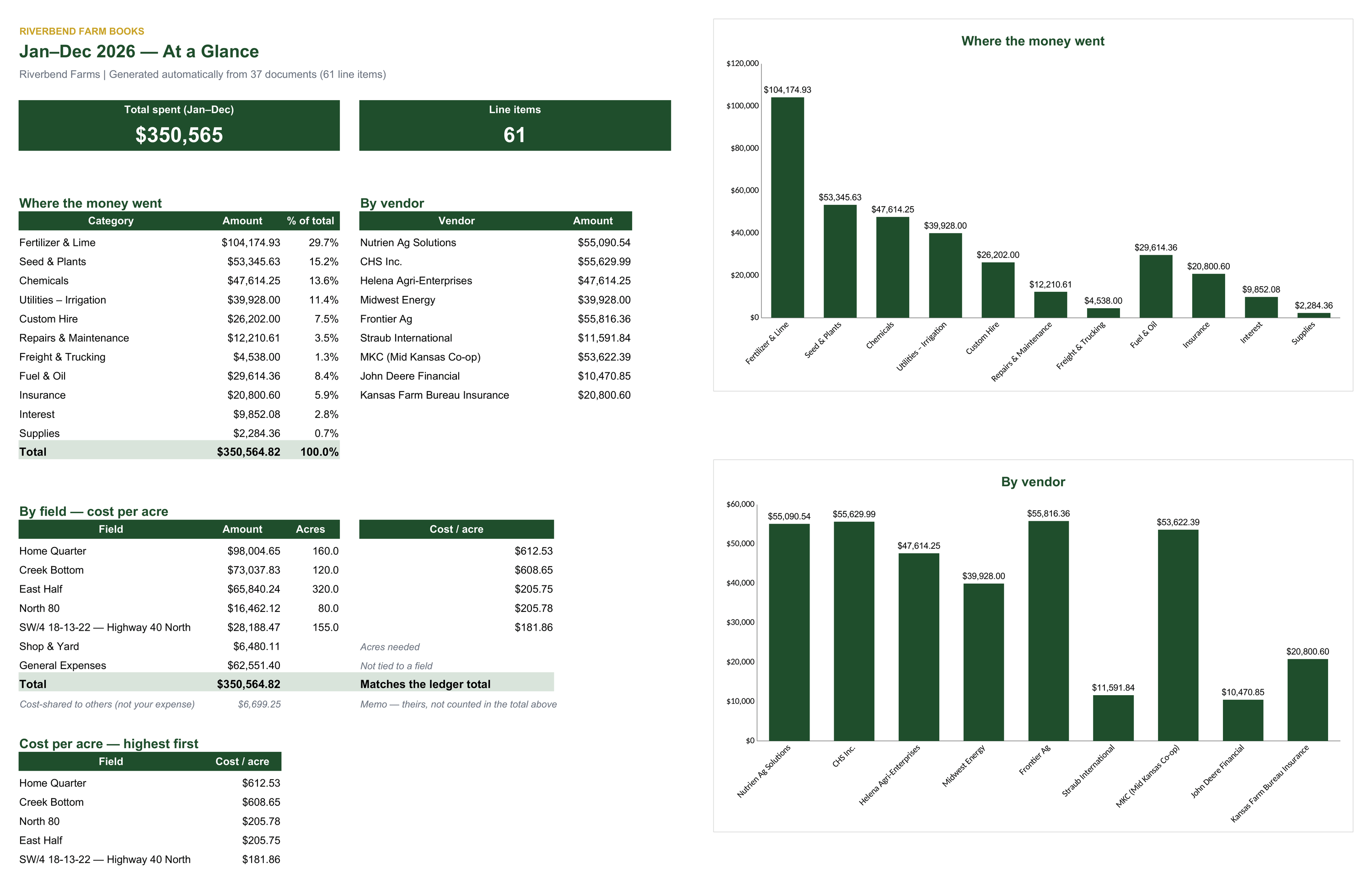
Swipe the sheet to see the charts.